Get Your Design System into Legacy Code: A Custom MCP and RAG Playbook That Cuts AI Cost
- Published on
The legacy code-update problem
On large products, shipping a new design system components is only half the battle. Getting the components into use across the codebase is a significant challenge. The design system team ships new components, but the legacy parts of the product keep using older patterns. Teams want to update the code, but the work is slow.
AI agents now look like a way to help. But when you point one at a million-line legacy repo, the agent has to grep, read files, and guess at conventions. The result is twenty dollars of tokens spent on a migration the team would not merge.
You don't need to read the console output below. It was meant to make you scary. 😱 Scroll down!
$ claude code "update src/legacy/CheckoutPage.tsx to use the new Button from @yourorg/ds"

⏺ Bash(grep -rln "Button" src --include="*.tsx")
  ⎿ 247 files matched

⏺ Read(node_modules/@yourorg/ds/README.md) — 14.2 KB
⏺ Bash(grep -rln "from '@yourorg/ds'" src)
  ⎿ 38 files

⏺ Read(src/billing/InvoiceActions.tsx) — 312 lines
⏺ Read(src/admin/UserList.tsx) — 478 lines
⏺ Read(src/dashboard/QuickActions.tsx) — 256 lines
⏺ Read(src/marketing/CTASection.tsx) — 189 lines
⏺ Read(src/onboarding/StepNav.tsx) — 421 lines

⏺ Read(src/legacy/components/Button.tsx) — 184 lines
⏺ Read(src/legacy/components/Button.module.scss) — 62 lines

  Thought for 47s — legacy Button uses `kind`. The new one
  likely uses `variant`; mapping primary→"solid",
  ghost→"subtle", danger→"destructive" by analogy with other
  libraries.

⏺ Read(src/legacy/CheckoutPage.tsx) — 1,043 lines
⏺ Edit(src/legacy/CheckoutPage.tsx) — 14 Button replacements

⏺ Bash(pnpm tsc --noEmit)
  ⎿ 6 errors
     Property 'variant' does not exist on type 'ButtonProps'.
     Type '"destructive"' is not assignable to '"primary" | "secondary" | "tertiary"'.
     …

⏺ Read(node_modules/@yourorg/ds/dist/Button.d.ts) — 87 lines

  Thought for 31s — the correct prop is `appearance`, not
  `variant`. Also need <ThemeProvider>, not <Theme>. Re-doing.

  ⋮ (8 more edit/typecheck iterations)

──────────────────────────────────────────────────────
  41 tool calls · 18,420 in / 3,205 out tokens
  4m 12s · $19.74

  Reviewer: "This isn't how we do it — see InvoiceActions
  for the pattern. Also use <ThemeWrapper>, not <Theme>."
  Status: closed without merge.
You don't need smarter model to fix this issues. The real game changer here is the corpus. By feeding the agent your team's actual git history, you're giving it a roadmap of successful migrations instead of making it guess from scratch.
The pattern compounds with codebase size. The larger and older the codebase, the worse naive AI does. The agent has to explore on every task: search the repository, open files, read conventions, infer what someone meant in a five-year-old commit. Exploration is what makes AI expensive on legacy code.
This article walks through the build and the use of a small system that gives the agent the answer instead of making it dig. Everything runs locally. Nothing leaves the developer's machine except one stateless API call at ingestion time, and even that one is optional.
Why a generic RAG tutorial gets you nowhere
If MCP and RAG are unfamiliar: RAG (retrieval-augmented generation) means the agent looks things up before answering, and uses what it finds. MCP (Model Context Protocol) is a standard way for the agent to call your lookup tool. That is the whole primer you need for this article.
Most RAG tutorials index your documentation. That is reasonable for many use cases, but for a design system it is not enough. Documentation tells the agent what components exist and what their props are. But it does not tell the agent how to update legacy code to use them.
The right corpus for that question is the one nobody writes tutorials about: your team's git diffs of past code updates that introduced design system components.
Why diffs? They encode before and after. The exact import paths. The prop renames. The wrappers you delete. The CSS classes that disappear. They show how an experienced engineer actually updates a legacy file, line by line. Adoption is the diff.
This is the article's spine. The build that follows is mechanical. The data choice is what makes it work.
What goes into the database
One record equals one file's diff inside one commit. Per-file-per-commit granularity matches the unit of update work. When an engineer updates a single file to use a new Button, that file's diff is one example. The next file in the same commit is another example. They are related but not identical, and they should be retrieved separately.
The schema is small. Seven fields plus the embedding:
| Field | What it holds | Why |
|---|---|---|
| commit sha | git hash | traceability |
| file path | path of the changed file | one record per file |
| diff | unified diff text | the actual pattern |
| commit message | message text | engineer's intent |
| components | list of design system components touched | filter and group |
| author, date | metadata | freshness, lineage |
| embedding | vector (1,536 numbers) | semantic search |
Why a vector at all? Without one, you would do keyword search. That works for "find me past updates that introduce Button." It breaks the moment the agent's question is "find me past examples where we replaced a clickable div with a primary action." No shared keywords, same intent. A vector embedding turns each diff into ~1,500 numbers that encode what the diff is doing. Two diffs about the same kind of change end up near each other in that space, even with zero word overlap. That is what semantic search buys you.
What goes into the embedding: the diff content together with the commit message. The agent searches by intent, so the system needs to embed the description of the change, not just the code.
Then there are the indexes. Three of them, each doing different work:
- HNSW on the embedding column. An approximate nearest-neighbor index over the vector space. Without it, every query scans every row. With it, finding the top-5 nearest diffs out of a thousand is sub-millisecond.
- GIN on the components array. This lets the agent ask "only show Button updates" and get a fast filtered subset before vector search runs. GIN handles array containment queries efficiently, which is exactly the pattern here.
- B-tree on commit sha. For dedupe (so the same diff is not indexed twice if the ingestion runs again) and for joining back to git when the agent needs the full commit context.
You do not need to invent these. pgvector ships with HNSW and Postgres ships with GIN. One CREATE INDEX each, then they are out of your way.
Finding the right commits
Not every commit is a design system update. Most of your git history is unrelated: feature work, bug fixes, refactors that have nothing to do with the design system. The filter is the only team-specific decision in this build. Everything else is mechanical.
A few strategies that work, ideally combined:
- Commit message convention. If your team prefixes adoption commits (
adopt:,migrate:, or a design system marker), filter on the prefix. This is the cleanest signal when it is available. - PR label or branch pattern. Branches named
ds-update/*or PRs labelleddesign-systemare a strong filter, especially in teams that already use PR taxonomy. - Files touched. Any commit that changes an import statement to point at
@yourorg/dsis a candidate. This is a generic filter that works in any repo, and it is hard to game. - Author roster. If your team has dedicated owners for legacy migration work, their commit history is gold. Their commits tend to be cleaner signal than the average.
Pick what your conventions already give you. If your team does not have such conventions, this exercise is also a forcing function to introduce them. Even a simple "tag adoption commits with ds:" agreement, applied going forward, will pay off in a few months.
The pipeline
The pipeline has three stages: extract, embed, store.
Extract walks the git history with your filter, then parses each matching commit into per-file records. For each file, it captures the diff, the commit message, and the metadata.
Embed sends each record's text to the embedding API and gets back a vector. This is one outbound call per record, on text only, never on your whole codebase. If your security policy does not allow even diff text to leave the machine, you can swap this for a local embedding model. The downstream code does not care.
Store inserts the records and their vectors into local Postgres, using the schema from above. With pgvector, the vector column is just another column type. There is no special storage layer.
Schematically:
git history → filter → embedding → Postgres + pgvector → MCP server → agent
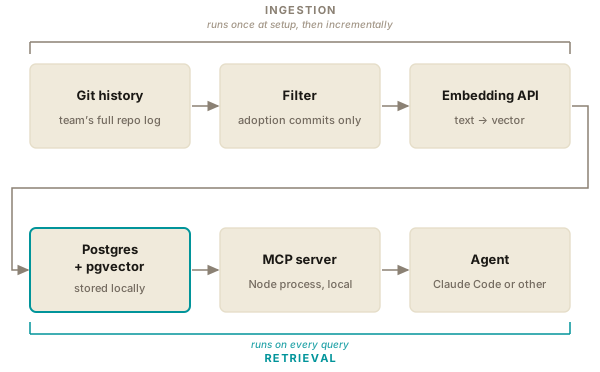
The whole pipeline runs once at setup, then incrementally on new commits. For a team with hundreds of past adoption commits, the first run takes a few minutes.
Why this stays local
For most enterprise work, sending source code to a cloud RAG vendor is not an option. Legal, security, IP. Pick your reason, the answer is the same. This rules out a number of off-the-shelf "give us your repo" products that would otherwise be the obvious answer.
The stack described here keeps everything on the developer's machine. Postgres for storage. An MCP server as a Node process. The agent itself local. The only outbound traffic is the embedding API call at ingestion time, and even that sees only diff text, not whole files. If that is still too much, the embedding API can be replaced with a local model running on the same machine.
pgvector with Postgres is boring infrastructure on purpose. There is no new vendor, no new ops surface, no new team to onboard. Most teams already have Postgres somewhere. If they do not, it is an afternoon to install and configure.
This local-first posture is what makes the playbook viable for the audience that needs it most. The teams with the largest, oldest legacy codebases are usually the ones with the strictest security requirements. The two constraints have to be met together, or the build does not ship.
How the agent uses it
The agent does not talk to the database directly. It calls your MCP tools, which then query the database. Two tools are enough for the use cases in this article:
search_adoption_examples(query, component?, limit)for semantic search over past diffs.list_indexed_components()for what has been used somewhere in the codebase already, with counts.
Before walking through how each one is used: AI agents are billed per token. Every file the agent reads, every grep it runs, every exploratory tool call costs you input tokens and adds latency. RAG is, among other things, a way to hand the agent a prepared answer instead of making it dig.
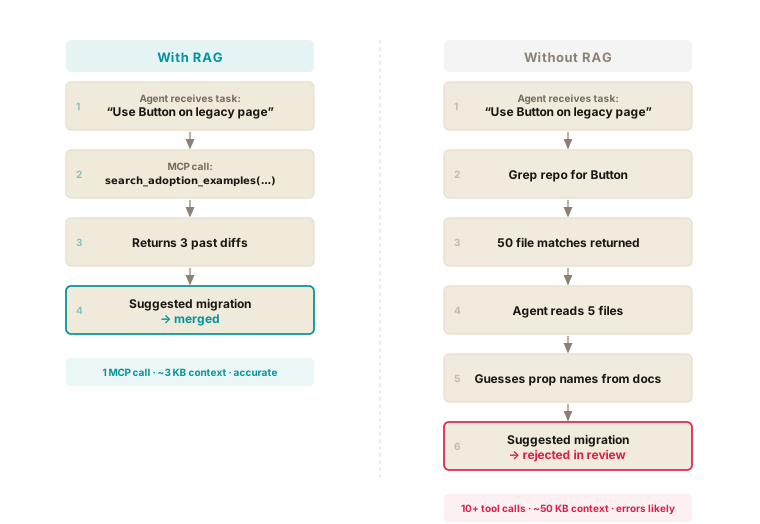
Use case 1. "Use our Button on this legacy page."
With RAG, the agent calls search_adoption_examples("use Button on legacy page", component: "Button") and gets three real diffs from past work. It applies the same import path, the same prop names, the same wrapper removal pattern. One MCP call, three small payloads, accurate output.
Without RAG, the agent has two bad options. Option A: read the design system docs and guess. The result is plausible-looking code with the wrong import path or hallucinated props, because docs describe the API, not the migration pattern. The team will not merge it. Option B: paste three example files into the prompt manually. That works once, but it does not scale. It dumps a lot of unrelated code into the context window (everything around the change, not just the change itself), and it relies on you already knowing which past files are good examples. If you knew that, you probably would not need an agent for this.
Use case 2. "What components are already partially in use?"
With RAG, the agent calls list_indexed_components() and gets an answer in one call. This drives migration planning. Which components have already been used somewhere in the legacy code? Which have not been touched at all? The answer shapes which migration to start next.
Without RAG, the agent has to discover this from scratch every time. The typical path: grep -r '@yourorg/ds' across the repository, then read enough of each match to figure out whether the import is actually used or just sitting unused after a half-finished migration. On a large codebase, that is hundreds of files and thousands of input tokens. Grep also cannot tell "in use" from "imported and forgotten." The same question gets asked again, every developer, every session.
Use case 3. "Why is the prop size='md' instead of size='medium'?"
With RAG, the agent searches for diffs that touched the rename. It finds the commit and returns the message: "renamed for consistency with our token names: width-md, gap-md, size-md." The history answers the question.
Without RAG, the agent's path is a fishing expedition. git log -S 'medium' returns dozens of unrelated commits. The agent reads each one's message, burning tokens on noise, until it finds the right one. Or it does not find it and guesses. Or it asks the developer, who asks a teammate, who asks the person who left the company two years ago.
To make this concrete, here is what an MCP tool actually returns when the agent asks about migrating a date input component. The response is lightly anonymized but otherwise verbatim:
Migration checklist

1. Change import to import { DateFieldV2 } from '@yourorg/ds'
2. Rename minDate→min, maxDate→max
3. Update onChange handler — receives value directly, not an event
4. Replace hideClear with showClear (flip the boolean)
5. Remove dateOnly/timeOnly props, use mode instead
6. Add accessibility props (ariaLabel, prevMonthAriaLabel, nextMonthAriaLabel)

15 files across the codebase were migrated in the main adoption commit (DS-412).
This is not a checklist the developer reads and applies by hand. The agent treats it as instructions. On the next legacy view that still uses the old DateField, the agent walks through the steps in order: rewrites the import, renames the props, restructures the onChange handler, flips the boolean. The retrieval becomes the migration plan, and the plan executes against every subsequent file the developer points it at.
The pattern across all three use cases is the same. Without retrieval, the agent compensates by exploring. Exploration is expensive in tokens, slow in wall time, and often inaccurate, because the agent gives up before it finds the real answer. RAG replaces exploration with retrieval.
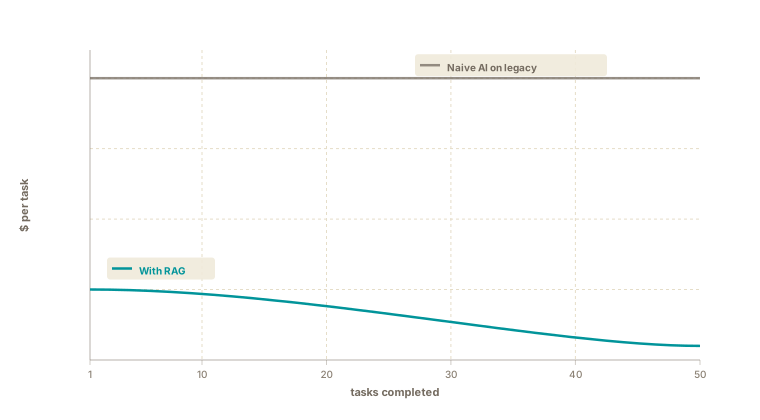
The cost story compounds. As the corpus grows, each new code-update task uses fewer tokens than the last. Naive AI on legacy does the opposite. Every new task pays the same exploration cost.
Telling whether it works
The corpus is small. Hundreds of diffs is a normal number. You can spot-check it without much effort.
A simple sanity test: search for "use Button on legacy page" and check that the top result is actually a Button update. If it is not, the filter is letting noise in, or the embedding is missing something.
A quality test, slightly more involved: pick a legacy page that has not been updated to use the design system, ask the agent to do it, and compare the result to a hand-done version. The differences will tell you where the corpus is thin and where it is rich.
A few failure modes to watch for. The filter being too broad: irrelevant commits clog up the results, and the agent gets confused. Diffs that are too large: a 500-line refactor commit overwhelms the embedding and produces noisy retrievals. Chunk these or skip them. Wrong component-name extraction: the heuristic that tags each record with components touched can miss complex cases. The fix is usually a tightening of one regular expression, not an architectural change.
What this changes for the team
The most direct change is that updating legacy code stops being one engineer's tribal knowledge. The patterns that one experienced person knows by heart become available to everyone, including the agent.
Onboarding to migration work compresses. A new engineer reviewing an agent-generated PR sees the same examples the agent saw. The review becomes a shared learning exercise.
Past decisions stay alive. When an owner of legacy work leaves the team, their diffs continue to teach the agent. The institutional memory does not walk out with them.
Your migration playbook stops being a document you write and stale-check. It becomes a corpus you cultivate. Every successful update adds to it. Every new component shipped by the design system team is one more entry once the first few teams use it.
Where to start
Pick one heavily-used component. Button is a reliable starting point, because most products have many of them and the migration patterns are simple enough to validate.
Find 20–50 past commits that introduced it, using whatever filter your conventions support.
Stand up Postgres with pgvector locally. Run the ingestion against your filter. Expose the two MCP tools.
Use it for one week on real code-update work. Pay attention to which retrievals were useful and which were noise. Iterate the filter based on what you see. After a week, you will know whether to expand to more components, tighten the filter, or change the embedding strategy.
The actual code for this setup is surprisingly simple. The real effort (and the real payoff) lies in curating the right data.